
Back from Italy! It was nice to be back in the old country, enjoying the weather, the food and the people.
2007-09-28
2007-05-28
Feeling purple...

It is the second week at my new job. So far I like it. The cafeteria is a definite improvement, and so it is the free coffee...
I also like the people and the problem. We shall see.
2007-05-13
Last day at IBM

Well, May 11th was my last day of work at IBM Almaden, 8 years and one day exactly since I joined the company. Sad to go, but excited about my new job at Yahoo!
I meet so many extraordinary people at IBM and I will be always thankful for the great opportunity they gave me to work on so many exciting research projects. Goodbye Almaden.

2007-02-12
Powerset party
Saturday night I was at the Powerset party in San Francisco, at the Frisson. Cool crowd and very interesting technology. They have a quite ambitious project of taking on the search problem using natural language processing. Given the team and the technology they might very well be able to pull it off.
2007-01-22
O'Reilly Radar > lca: Andrae Muys on RDF
Cool, news about mulgara seems finally to be spreading. I have been playing around with mulgara and I must say that I have been very impressed by it. See:
O'Reilly Radar > lca: Andrae Muys on RDF
O'Reilly Radar > lca: Andrae Muys on RDF
2007-01-10
L'avvelenata, Guccini e Bertoncelli
Mi sono spesso chiesto chi fosse il Bertoncelli dell'Avvelenata di Guccini. Dopo un po' di ricerca ho trovato questo articolo
2007-01-03
Rational Application Developer 7 on Kubuntu/ubuntu Edgy Eft
After struggling to install RAD7 on kubuntu (it fails at the installation of the websphere 6.1 runtime), a collegue of mine found this posting:
WebSphere Portal 6 on Ubuntu (continued) - Exception: null
So, if you are struggling to get RAD7 installed on your kubuntu/ubuntu machine here is the procedure:
1) make /bin/sh point at bash: cd /bin; sudo ln -sf bash sh
2) install RAD7
3) replace the shell in the scripts: sudo perl -p -i -e "s/\/sh$/\/bash/" /opt/IBM/SDP70/runtimes/base_v61/bin/*.sh
4) replace the shell in the script for the profile management: sudo perl -p -i -e "s/\/sh$/\/bash/" /opt/IBM/SDP70/runtimes/base_v61/bin/ProfileManagement/*.sh
5) enable write access to the profile, so that you can develop using your user account: sudo chmod -R a+w /opt/IBM/SDP70/runtimes/base_v61/profiles/AppSrv01
6) restore the original link: cd /bin; sudo ln -sf dash sh
and then enjoy RAD7 running under ubuntu!
An alternative to step 1-3, contribuited by Joshua Purcell (see comments to this post), is to run:
sudo dpkg-reconfigure dash
Choose 'no' when it asks if you want to make sh symbolically link to dash. The same command can be used in place of step 6 if you ever want to switch back to dash.
Thanks Joshua!
PS: ubuntu and kubuntu are not officialy supported by IBM/Rational, so use at your own risk.
WebSphere Portal 6 on Ubuntu (continued) - Exception: null
So, if you are struggling to get RAD7 installed on your kubuntu/ubuntu machine here is the procedure:
1) make /bin/sh point at bash: cd /bin; sudo ln -sf bash sh
2) install RAD7
3) replace the shell in the scripts: sudo perl -p -i -e "s/\/sh$/\/bash/" /opt/IBM/SDP70/runtimes/base_v61/bin/*.sh
4) replace the shell in the script for the profile management: sudo perl -p -i -e "s/\/sh$/\/bash/" /opt/IBM/SDP70/runtimes/base_v61/bin/ProfileManagement/*.sh
5) enable write access to the profile, so that you can develop using your user account: sudo chmod -R a+w /opt/IBM/SDP70/runtimes/base_v61/profiles/AppSrv01
6) restore the original link: cd /bin; sudo ln -sf dash sh
and then enjoy RAD7 running under ubuntu!
An alternative to step 1-3, contribuited by Joshua Purcell (see comments to this post), is to run:
sudo dpkg-reconfigure dash
Choose 'no' when it asks if you want to make sh symbolically link to dash. The same command can be used in place of step 6 if you ever want to switch back to dash.
Thanks Joshua!
PS: ubuntu and kubuntu are not officialy supported by IBM/Rational, so use at your own risk.
2006-12-07
Green screen of death of the iSight
Lately my Core 2 Duo 20" iMac was having trouble with the embedded iSight camera: in Photo Booth was showing just a green screen.
I knew it was not an hardware problem because skype could use the camera without problems, but no joy with any of the apple apps: Photo Booth, iChat, iMovie. They all showed the green screen.
After searching on the Internet I found several suggestions pointing to resetting the SMC.
I tried that and, lo and behold, iSight works again! Woo Hoo!
I knew it was not an hardware problem because skype could use the camera without problems, but no joy with any of the apple apps: Photo Booth, iChat, iMovie. They all showed the green screen.
After searching on the Internet I found several suggestions pointing to resetting the SMC.
I tried that and, lo and behold, iSight works again! Woo Hoo!
2006-10-10
Like Avedon
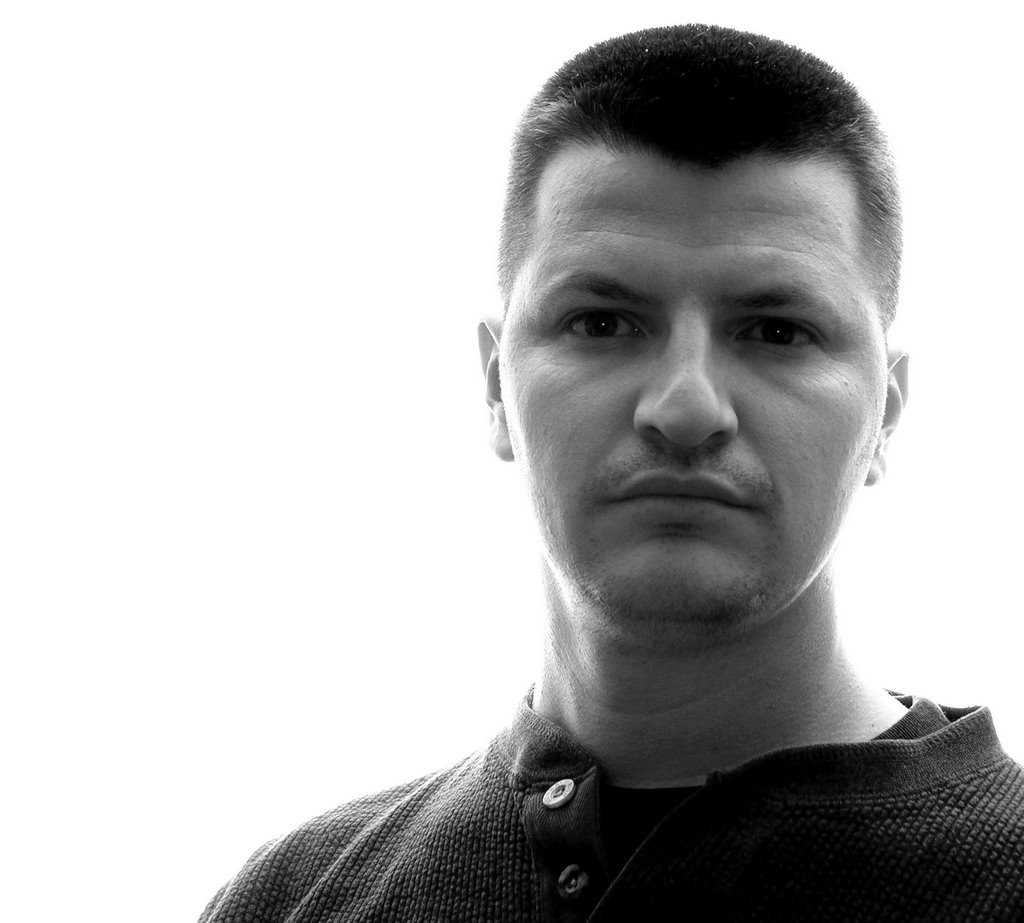
I like Avedon's style when it comes to portraits, so I tried a self portrait in his style. Here is it. My wife thinks that I look like a convict... go figure!
2006-10-06
Subscribe to:
Posts (Atom)